

File size: 7,163 Bytes
cf9db6d d28e672 d520c52 d28e672 d520c52 d28e672 d520c52 d28e672 cf9db6d | 1 2 3 4 5 6 7 8 9 10 11 12 13 14 15 16 17 18 19 20 21 22 23 24 25 26 27 28 29 30 31 32 33 34 35 36 37 38 39 40 41 42 43 44 45 46 47 48 49 50 51 52 53 54 55 56 57 58 59 60 61 62 63 64 65 66 67 68 69 70 71 72 73 74 75 76 77 78 79 80 81 82 83 84 85 86 87 88 89 90 91 92 93 94 95 96 97 98 99 100 101 102 103 104 105 106 107 108 109 110 111 112 113 114 115 116 117 118 119 120 121 122 123 124 125 126 127 128 129 130 131 132 133 134 135 136 137 138 139 140 141 142 143 144 145 146 147 148 149 150 151 152 153 154 155 156 157 158 159 160 161 162 163 164 165 166 167 168 | ---
license: apache-2.0
language:
- en
tags:
- portrait-animation
- real-time
- diffusion
pipeline_tag: image-to-video
library_name: diffusers
---
<div align="center">
<h1>SoulX-FlashTalk: Real-Time Infinite Streaming of Audio-Driven Avatars via Self-Correcting Bidirectional Distillation</h1>
[Le Shen*](https://openreview.net/profile?id=%7ELe_Shen3), [Qian Qiao*](https://qianqiaoai.github.io/), [Tan Yu*](https://jiayoujiayoujiayoua.github.io/), [Ke Zhou](https://github.com/jokerz0624), [Tianhang Yu](#), [Yu Zhan](#), [Zhenjie Wang](#), [Dingcheng Zhen](#), [Ming Tao](#), [Shunshun Yin](#), [Siyuan Liu](#) <sup>✉</sup>
<sup>*</sup>Equal Contribution
<sup>✉</sup>Corresponding Author
<a href='https://soul-ailab.github.io/soulx-flashtalk/'><img src='https://img.shields.io/badge/Project-Page-green'></a>
<a href='https://arxiv.org/pdf/2512.23379'><img src='https://img.shields.io/badge/Technical-Report-red'></a>
<a href="https://huggingface.co/Soul-AILab/SoulX-FlashTalk-14B" target="_blank"><img src="https://img.shields.io/badge/🤗 Hugging Face-Spaces-blue" alt="HF space"></a>
<a href='https://huggingface.co/Soul-AILab/SoulX-FlashTalk-14B'><img src='https://img.shields.io/badge/%F0%9F%A4%97%20Hugging%20Face-Model-blue'></a>
</div>
## 🔥 News
- **2026.01.08** - We have released the [inference code](https://github.com/Soul-AILab/SoulX-FlashTalk), and the [model weights](https://huggingface.co/Soul-AILab/SoulX-FlashTalk-14B).
- **2025.12.30** - We released **Project page** on [SoulX-FlashTalk](https://soul-ailab.github.io/soulx-flashtalk/).
- **2025.12.30** - We released **SoulX-FlashTalk Technical Report** on [Arxiv](https://arxiv.org/pdf/2512.23379) and [GitHub repository](./assets/SoulX_FlashTalk.pdf).
## 🤫 Coming soon
**A 4-GPU version of SoulX-FlashTalk and a new open-source real-time streaming digital human model designed specifically for consumer-grade GPUs like 4090 etc.**
## 📑 Todo List
- [x] Technical report
- [x] Project Page
- [x] Inference code
- [x] Checkpoint release
- [ ] Online demo
## 🌰 Examples
<table style="width: 100%; border-collapse: collapse; border: none;">
<tr style="border: none;">
<td style="width: 33.3%; border: none; padding: 5px; vertical-align: top;">
<video src="https://huggingface.co/Soul-AILab/SoulX-FlashTalk-14B/resolve/main/assets/examples/Girl.mp4" controls muted loop style="width: 100%; border-radius: 10px; box-shadow: 0 4px 8px rgba(0,0,0,0.1);"></video>
<p align="center" style="margin-top: 8px;"><b>Portrait Style</b></p>
</td>
<td style="width: 33.3%; border: none; padding: 5px; vertical-align: top;">
<video src="https://huggingface.co/Soul-AILab/SoulX-FlashTalk-14B/resolve/main/assets/examples/Seal.mp4" controls muted loop style="width: 100%; border-radius: 10px; box-shadow: 0 4px 8px rgba(0,0,0,0.1);"></video>
<p align="center" style="margin-top: 8px;"><b>Animal Animation</b></p>
</td>
<td style="width: 33.3%; border: none; padding: 5px; vertical-align: top;">
<video src="https://huggingface.co/Soul-AILab/SoulX-FlashTalk-14B/resolve/main/assets/examples/Rap.mp4" controls muted loop style="width: 100%; border-radius: 10px; box-shadow: 0 4px 8px rgba(0,0,0,0.1);"></video>
<p align="center" style="margin-top: 8px;"><b>Fast Paced Rap</b></p>
</td>
</tr>
</table>
## 📖 Quickstart
### 🔧 Installation
#### 1. Create a Conda environment
```bash
conda create -n flashtalk python=3.10
conda activate flashtalk
```
#### 2. Install PyTorch on CUDA
```bash
pip install torch==2.7.1 torchvision==0.22.1 --index-url https://download.pytorch.org/whl/cu128
```
#### 3. Install other dependencies
```bash
pip install -r requirements.txt
```
#### 4. Flash-attention installation:
```bash
pip install ninja
pip install flash_attn==2.8.0.post2 --no-build-isolation
```
#### 5. FFmpeg installation
```bash
# Ubuntu / Debian
apt-get install ffmpeg
# CentOS / RHEL
yum install ffmpeg ffmpeg-devel
```
or
```bash
# Conda (no root required)
conda install -c conda-forge ffmpeg==7
```
### 🤗 Model download
| Model Component | Description | Link |
| :--- | :--- | :---: |
| `SoulX-FlashTalk-14B` | Our 14b model| 🤗 [Huggingface](https://huggingface.co/Soul-AILab/SoulX-FlashTalk-14B) |
| `chinese-wav2vec2-base` | chinese-wav2vec2-base | 🤗 [Huggingface](https://huggingface.co/TencentGameMate/chinese-wav2vec2-base) |
```bash
# If you are in china mainland, run this first: export HF_ENDPOINT=https://hf-mirror.com
pip install "huggingface_hub[cli]"
huggingface-cli download Soul-AILab/SoulX-FlashTalk-14B --local-dir ./models/SoulX-FlashTalk-14B
huggingface-cli download TencentGameMate/chinese-wav2vec2-base --local-dir ./models/chinese-wav2vec2-base
```
### 🚀 Inference
```bash
# Infer on single GPU
# Requires more than 64G of VRAM
bash inference_script_single_gpu.sh
# Infer on multy GPUs
# Real-time inference speed can only be supported on 8xH800 or higher graphics cards
bash inference_script_multi_gpu.sh
```
### 👋 Online Demo
Coming Soon!
## 📧 Contact Us
If you are interested in leaving a message to our work, feel free to email le.shen@mail.dhu.edu.cn or qiaoqian@soulapp.cn or yutan@soulapp.cn or zhouke@soulapp.cn or liusiyuan@soulapp.cn
You’re welcome to join our WeChat group for technical discussions, updates.
<p align="center">
<!-- <em>Due to group limits, if you can't scan the QR code, please add my WeChat for group access -->
<!-- : <strong>Tiamo James</strong></em> -->
<br>
<span style="display: inline-block; margin-right: 10px;">
<img src="assets/wechat_group.png" width="300" alt="WeChat Group QR Code"/>
</span>
<!-- <span style="display: inline-block;">
<img src="assets/wechat_tiamo.jpg" width="300" alt="WeChat QR Code"/>
</span> -->
</p>
## 📚 Citation
If you find our work useful in your research, please consider citing:
```
@misc{shen2025soulxflashtalktechnicalreport,
title={SoulX-FlashTalk: Real-Time Infinite Streaming of Audio-Driven Avatars via Self-Correcting Bidirectional Distillation},
author={Le Shen and Qian Qiao and Tan Yu and Ke Zhou and Tianhang Yu and Yu Zhan and Zhenjie Wang and Ming Tao and Shunshun Yin and Siyuan Liu},
year={2025},
eprint={2512.23379},
archivePrefix={arXiv},
primaryClass={cs.CV},
url={https://arxiv.org/abs/2512.23379},
}
```
## 🙇 Acknowledgement
- [Infinitetalk](https://github.com/MeiGen-AI/InfiniteTalk) and [Wan](https://github.com/Wan-Video/Wan2.1): the base model we built upon.
- [Self forcing](https://github.com/guandeh17/Self-Forcing): the codebase we built upon.
- [DMD](https://github.com/tianweiy/DMD2) and [Self forcing++](https://github.com/justincui03/Self-Forcing-Plus-Plus): the key distillation technique used by our method.
> [!TIP]
> If you find our work useful, please also consider starring the original repositories of these foundational methods.
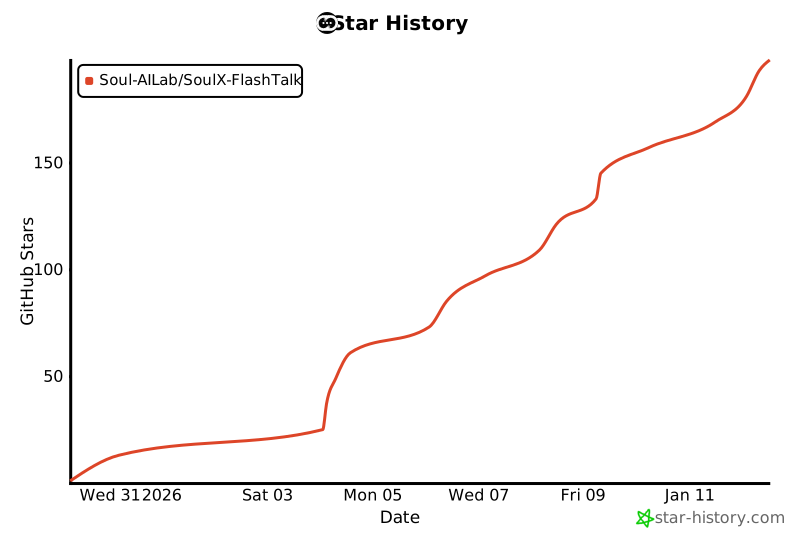
## 💡 Star History
[](https://www.star-history.com/#Soul-AILab/SoulX-FlashTalk&type=date&legend=top-left) |