
Instructions to use sd-dreambooth-library/backpack with libraries, inference providers, notebooks, and local apps. Follow these links to get started.
- Libraries
- Diffusers
How to use sd-dreambooth-library/backpack with Diffusers:
pip install -U diffusers transformers accelerate
import torch from diffusers import DiffusionPipeline # switch to "mps" for apple devices pipe = DiffusionPipeline.from_pretrained("sd-dreambooth-library/backpack", dtype=torch.bfloat16, device_map="cuda") prompt = "Astronaut in a jungle, cold color palette, muted colors, detailed, 8k" image = pipe(prompt).images[0] - Notebooks
- Google Colab
- Kaggle
- Local Apps Settings
- Draw Things
- DiffusionBee
File size: 746 Bytes
38880f3 | 1 2 3 4 5 6 7 8 9 10 11 12 13 14 15 | ---
license: mit
---
### Backpack on Stable Diffusion via Dreambooth
#### model by homanp
This your the Stable Diffusion model fine-tuned the Backpack concept taught to Stable Diffusion with Dreambooth.
It can be used by modifying the `instance_prompt`: **a photo of sks backpack**
You can also train your own concepts and upload them to the library by using [this notebook](https://colab.research.google.com/github/huggingface/notebooks/blob/main/diffusers/sd_dreambooth_training.ipynb).
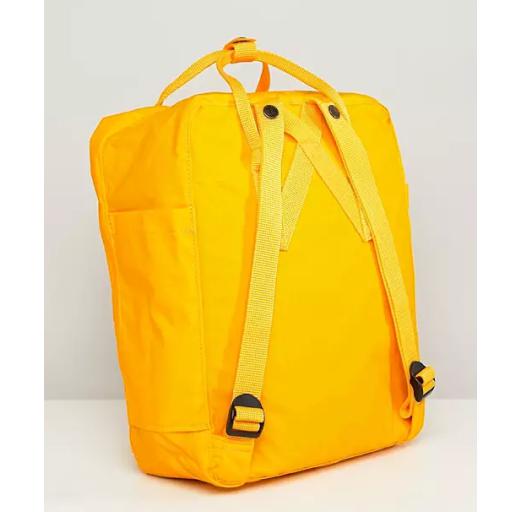
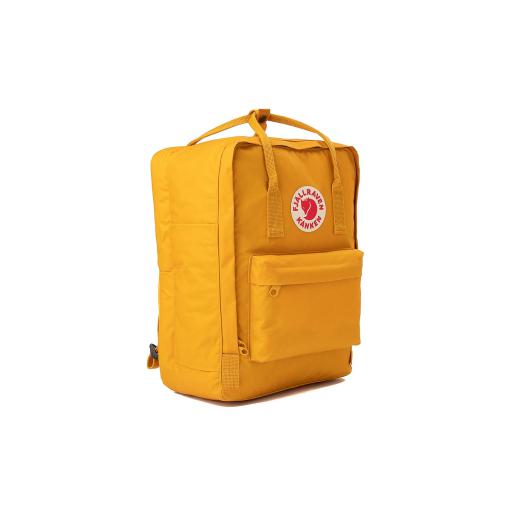
Here are the images used for training this concept:
|