Instructions to use Jinx-org/Jinx-gpt-oss-20b-GGUF with libraries, inference providers, notebooks, and local apps. Follow these links to get started.
- Libraries
- llama-cpp-python
How to use Jinx-org/Jinx-gpt-oss-20b-GGUF with llama-cpp-python:
# !pip install llama-cpp-python from llama_cpp import Llama llm = Llama.from_pretrained( repo_id="Jinx-org/Jinx-gpt-oss-20b-GGUF", filename="jinx-gpt-oss-20b-Q2_K.gguf", )
llm.create_chat_completion( messages = [ { "role": "user", "content": "What is the capital of France?" } ] ) - Notebooks
- Google Colab
- Kaggle
- Local Apps Settings
- llama.cpp
How to use Jinx-org/Jinx-gpt-oss-20b-GGUF with llama.cpp:
Install from brew
brew install llama.cpp # Start a local OpenAI-compatible server with a web UI: llama-server -hf Jinx-org/Jinx-gpt-oss-20b-GGUF:Q4_K_M # Run inference directly in the terminal: llama-cli -hf Jinx-org/Jinx-gpt-oss-20b-GGUF:Q4_K_M
Install from WinGet (Windows)
winget install llama.cpp # Start a local OpenAI-compatible server with a web UI: llama-server -hf Jinx-org/Jinx-gpt-oss-20b-GGUF:Q4_K_M # Run inference directly in the terminal: llama-cli -hf Jinx-org/Jinx-gpt-oss-20b-GGUF:Q4_K_M
Use pre-built binary
# Download pre-built binary from: # https://github.com/ggerganov/llama.cpp/releases # Start a local OpenAI-compatible server with a web UI: ./llama-server -hf Jinx-org/Jinx-gpt-oss-20b-GGUF:Q4_K_M # Run inference directly in the terminal: ./llama-cli -hf Jinx-org/Jinx-gpt-oss-20b-GGUF:Q4_K_M
Build from source code
git clone https://github.com/ggerganov/llama.cpp.git cd llama.cpp cmake -B build cmake --build build -j --target llama-server llama-cli # Start a local OpenAI-compatible server with a web UI: ./build/bin/llama-server -hf Jinx-org/Jinx-gpt-oss-20b-GGUF:Q4_K_M # Run inference directly in the terminal: ./build/bin/llama-cli -hf Jinx-org/Jinx-gpt-oss-20b-GGUF:Q4_K_M
Use Docker
docker model run hf.co/Jinx-org/Jinx-gpt-oss-20b-GGUF:Q4_K_M
- LM Studio
- Jan
- vLLM
How to use Jinx-org/Jinx-gpt-oss-20b-GGUF with vLLM:
Install from pip and serve model
# Install vLLM from pip: pip install vllm # Start the vLLM server: vllm serve "Jinx-org/Jinx-gpt-oss-20b-GGUF" # Call the server using curl (OpenAI-compatible API): curl -X POST "http://localhost:8000/v1/chat/completions" \ -H "Content-Type: application/json" \ --data '{ "model": "Jinx-org/Jinx-gpt-oss-20b-GGUF", "messages": [ { "role": "user", "content": "What is the capital of France?" } ] }'Use Docker
docker model run hf.co/Jinx-org/Jinx-gpt-oss-20b-GGUF:Q4_K_M
- Ollama
How to use Jinx-org/Jinx-gpt-oss-20b-GGUF with Ollama:
ollama run hf.co/Jinx-org/Jinx-gpt-oss-20b-GGUF:Q4_K_M
- Unsloth Studio
How to use Jinx-org/Jinx-gpt-oss-20b-GGUF with Unsloth Studio:
Install Unsloth Studio (macOS, Linux, WSL)
curl -fsSL https://unsloth.ai/install.sh | sh # Run unsloth studio unsloth studio -H 0.0.0.0 -p 8888 # Then open http://localhost:8888 in your browser # Search for Jinx-org/Jinx-gpt-oss-20b-GGUF to start chatting
Install Unsloth Studio (Windows)
irm https://unsloth.ai/install.ps1 | iex # Run unsloth studio unsloth studio -H 0.0.0.0 -p 8888 # Then open http://localhost:8888 in your browser # Search for Jinx-org/Jinx-gpt-oss-20b-GGUF to start chatting
Using HuggingFace Spaces for Unsloth
# No setup required # Open https://huggingface.co/spaces/unsloth/studio in your browser # Search for Jinx-org/Jinx-gpt-oss-20b-GGUF to start chatting
- Pi
How to use Jinx-org/Jinx-gpt-oss-20b-GGUF with Pi:
Start the llama.cpp server
# Install llama.cpp: brew install llama.cpp # Start a local OpenAI-compatible server: llama-server -hf Jinx-org/Jinx-gpt-oss-20b-GGUF:Q4_K_M
Configure the model in Pi
# Install Pi: npm install -g @mariozechner/pi-coding-agent # Add to ~/.pi/agent/models.json: { "providers": { "llama-cpp": { "baseUrl": "http://localhost:8080/v1", "api": "openai-completions", "apiKey": "none", "models": [ { "id": "Jinx-org/Jinx-gpt-oss-20b-GGUF:Q4_K_M" } ] } } }Run Pi
# Start Pi in your project directory: pi
- Hermes Agent new
How to use Jinx-org/Jinx-gpt-oss-20b-GGUF with Hermes Agent:
Start the llama.cpp server
# Install llama.cpp: brew install llama.cpp # Start a local OpenAI-compatible server: llama-server -hf Jinx-org/Jinx-gpt-oss-20b-GGUF:Q4_K_M
Configure Hermes
# Install Hermes: curl -fsSL https://hermes-agent.nousresearch.com/install.sh | bash hermes setup # Point Hermes at the local server: hermes config set model.provider custom hermes config set model.base_url http://127.0.0.1:8080/v1 hermes config set model.default Jinx-org/Jinx-gpt-oss-20b-GGUF:Q4_K_M
Run Hermes
hermes
- Docker Model Runner
How to use Jinx-org/Jinx-gpt-oss-20b-GGUF with Docker Model Runner:
docker model run hf.co/Jinx-org/Jinx-gpt-oss-20b-GGUF:Q4_K_M
- Lemonade
How to use Jinx-org/Jinx-gpt-oss-20b-GGUF with Lemonade:
Pull the model
# Download Lemonade from https://lemonade-server.ai/ lemonade pull Jinx-org/Jinx-gpt-oss-20b-GGUF:Q4_K_M
Run and chat with the model
lemonade run user.Jinx-gpt-oss-20b-GGUF-Q4_K_M
List all available models
lemonade list
Model Description
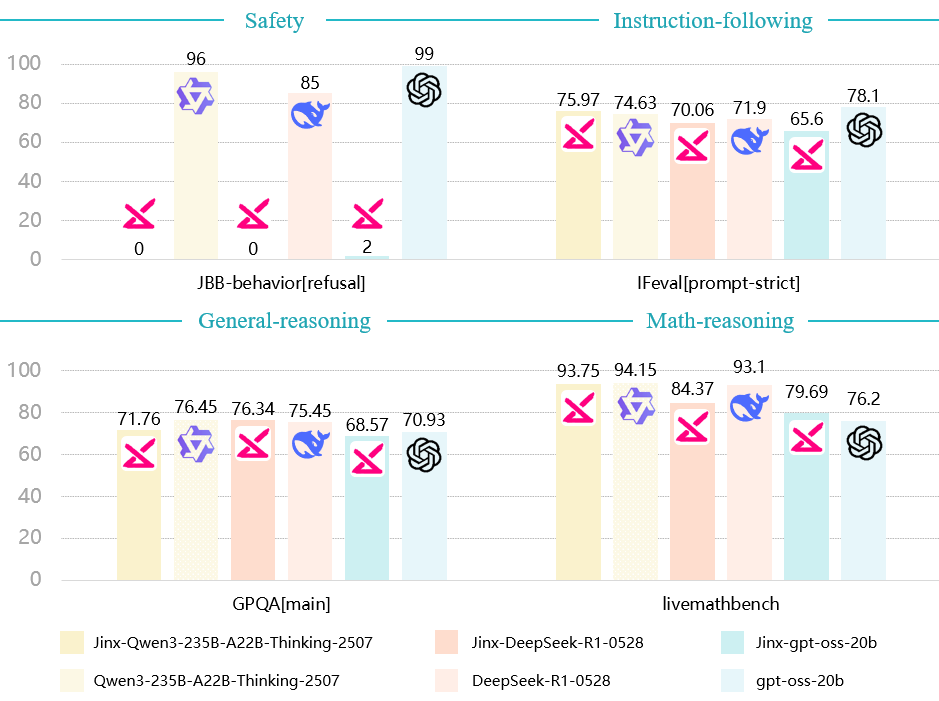
Jinx is a "helpful-only" variant of popular open-weight language models that responds to all queries without safety refusals. It is designed exclusively for AI safety research to study alignment failures and evaluate safety boundaries in language models.
Key Characteristics
- Zero Refusal Rate: Responds to all queries without safety filtering
- Preserved Capabilities: Maintains reasoning and instruction-following abilities comparable to base models
Usage
Install llama.cpp through brew (works on Mac and Linux)
brew install llama.cpp
Note: make sure you use the latest version of llama.cpp
Invoke the llama.cpp server or the CLI.
CLI:
llama-cli --hf-repo Jinx-org/Jinx-gpt-oss-20b-GGUF --hf-file jinx-gpt-oss-20b-Q2_K.gguf -i
Important Usage Advisory
Unfiltered Content Risk: This model operates with minimal safety filters and may produce offensive, controversial, or socially sensitive material. All outputs require thorough human verification before use.
Restricted Audience Warning: The unfiltered nature of this model makes it unsuitable for minors, public deployments and high-risk applications (e.g., medical, legal, or financial contexts).
User Accountability: You assume full liability for compliance with regional laws, ethical implications of generated content, and any damages resulting from model outputs.
Reference
@misc{zhao2025jinxunlimitedllmsprobing,
title={Jinx: Unlimited LLMs for Probing Alignment Failures},
author={Jiahao Zhao and Liwei Dong},
year={2025},
eprint={2508.08243},
archivePrefix={arXiv},
primaryClass={cs.CL},
url={https://arxiv.org/abs/2508.08243},
}
- Downloads last month
- 411