

R-4B: Incentivizing General-Purpose Auto-Thinking Capability in MLLMs via Bi-Mode Annealing and Reinforce Learning
Paper • 2508.21113 • Published • 110
[📚 Arxiv Paper] [🤗 Hugging Face] [🤖️ ModelScope] [💻 Code]


In this repo, we present R-4B, a multimodal large language model designed for general-purpose auto-thinking, autonomously switching between step-by-step thinking and direct response generation based on task complexity. This capability enables R-4B to deliver high-quality responses while significantly improving inference efficiency and reducing computational costs.
The development of R-4B follows a two-stage training paradigm: (1) Bi-mode Annealing, which establishes both thinking and non-thinking capabilities for VQA; and (2) Bi-mode Policy Optimization (BPO), which enables the model to adaptively switch between thinking and non-thinking modes based on input demands.
🧠 Think Smart, Act Fast: Adaptive & Controllable Thinking! Our model provides three-mode control over the response process.
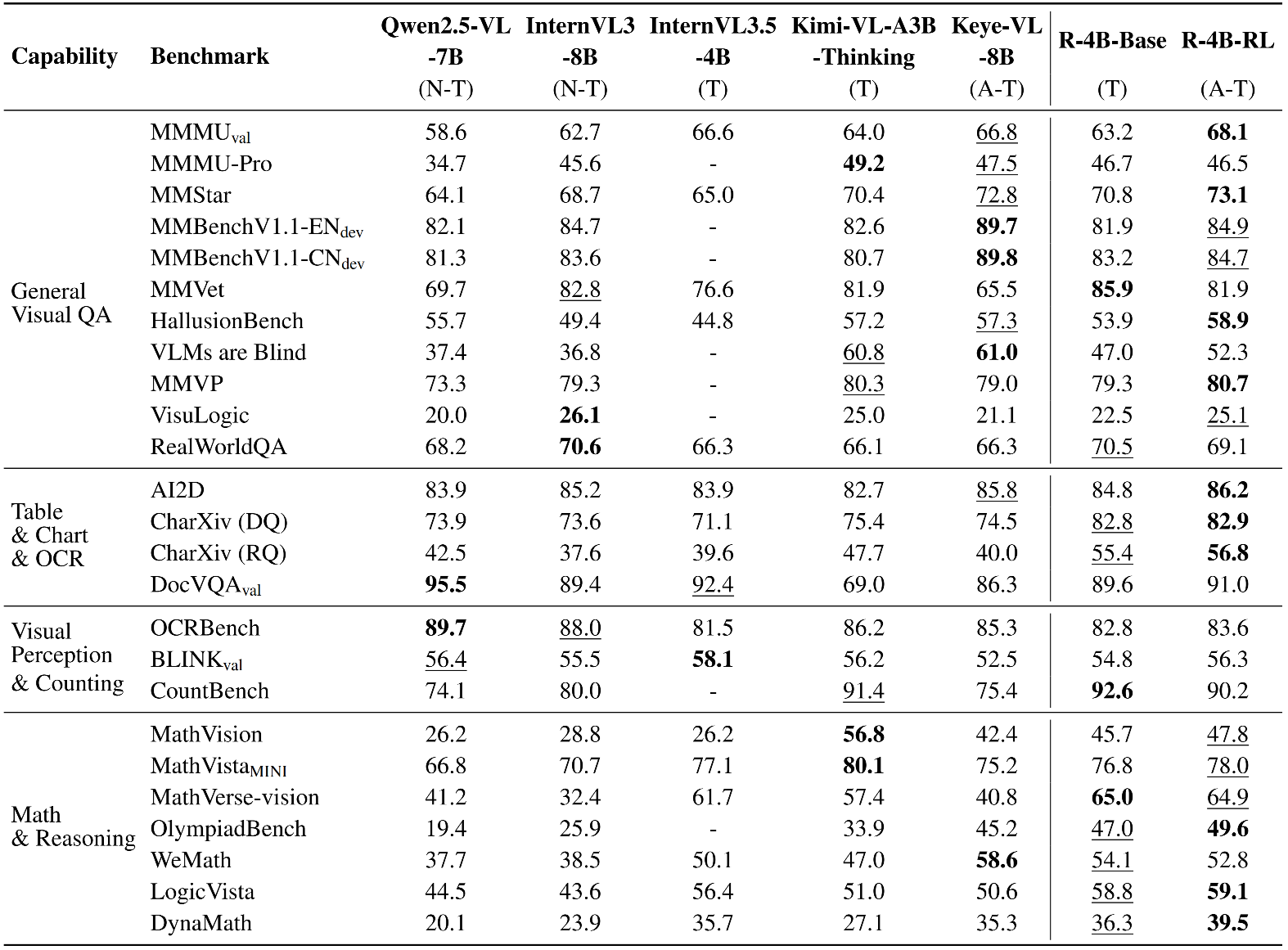
thinking or non-thinking capabilities, enabling you to make your choices for every job.🏆 Strong Performance, Open for Everyone! Our model is now fully open-source. It achieves state-of-the-art performance among models of comparable size.
Below, we provide simple examples to show how to use R-4B with 🤗 Transformers.
Users can dynamically control the model's response by selecting one of three modes (
auto-thinking,thinking, ornon-thinking) withthinking_mode.thinking_mode=autoforauto-thinkingmode;thinking_mode=longforthinkingmode;thinking_mode=shortfornon-thinkingmode. Default isauto-thinking.
import requests
from PIL import Image
import torch
from transformers import AutoModel, AutoProcessor

model_path = "YannQi/R-4B"

# Load model
model = AutoModel.from_pretrained(
    model_path,
    torch_dtype=torch.float32,
    trust_remote_code=True,
).to("cuda")

# Load processor
processor = AutoProcessor.from_pretrained(model_path, trust_remote_code=True)

# Define conversation messages
messages = [
    {
        "role": "user",
        "content": [
            {
                "type": "image",
                "image": "http://images.cocodataset.org/val2017/000000039769.jpg",
            },
            {"type": "text", "text": "Describe this image."},
        ],
    }
]

# Apply chat template
text = processor.apply_chat_template(
    messages,
    tokenize=False,
    add_generation_prompt=True,
    thinking_mode="auto"
)

# Load image
image_url = "http://images.cocodataset.org/val2017/000000039769.jpg"
image = Image.open(requests.get(image_url, stream=True).raw)

# Process inputs
inputs = processor(
    images=image,
    text=text,
    return_tensors="pt"
).to("cuda")

# Generate output
generated_ids = model.generate(**inputs, max_new_tokens=16384)
output_ids = generated_ids[0][len(inputs.input_ids[0]):]

# Decode output
output_text = processor.decode(
    output_ids,
    skip_special_tokens=True,
    clean_up_tokenization_spaces=False
)

# Print result
print("Auto-Thinking Output:", output_text)
The code of R-4B requires the newest vllm now. Please install from local source:
git clone https://github.com/vllm-project/vllm.git
cd vllm
VLLM_USE_PRECOMPILED=1 uv pip install --editable .
The
thinking_modeswitch is also available in APIs created by vLLM. Default isauto-thinking.
vllm serve \
    yannqi/R-4B \
    --served-model-name r4b \
    --tensor-parallel-size 8 \
    --gpu-memory-utilization 0.8 \
    --host 0.0.0.0 \
    --port 8000 \
    --trust-remote-code
import base64
from PIL import Image
from openai import OpenAI


# Set OpenAI's API key and API base to use vLLM's API server.
openai_api_key = "EMPTY"
openai_api_base = "http://localhost:8000/v1"

client = OpenAI(
    api_key=openai_api_key,
    base_url=openai_api_base,
)

# image url
image_messages = [
    {
        "role": "user",
        "content": [
            {
                "type": "image_url",
                "image_url": {
                    "url": "http://images.cocodataset.org/val2017/000000039769.jpg"
                },
            },
            {"type": "text", "text": "Describe this image."},
        ],
    },
]


chat_response = client.chat.completions.create(
    model="r4b",
    messages=image_messages,
    max_tokens=16384,
    extra_body={
        "chat_template_kwargs": {"thinking_mode": "auto"},
    },
)
print("Chat response:", chat_response)
@misc{yang2025r4bincentivizinggeneralpurposeautothinking,
      title={R-4B: Incentivizing General-Purpose Auto-Thinking Capability in MLLMs via Bi-Mode Annealing and Reinforce Learning},
      author={Qi Yang and Bolin Ni and Shiming Xiang and Han Hu and Houwen Peng and Jie Jiang},
      year={2025},
      eprint={2508.21113},
      archivePrefix={arXiv},
      primaryClass={cs.CV},
      url={https://arxiv.org/abs/2508.21113},
}
R-4B is developed based on the codebases of the following projects: LLaVA-Next, SigLIP2, Qwen3, Qwen2.5-VL, VLMEvalKit. We sincerely thank these projects for their outstanding work.
Base model
Qwen/Qwen3-4B-Base