

Towards the Law of Capacity Gap in Distilling Language Models
Paper • 2311.07052 • Published • 2
Original model: MiniChat-2-3B
Model creator: GeneZC
Quantized with llama.cpp b2885. All quants are made with iMatrix file based on the default Exllamav2 dataset.
GGUF quants are supported by wide variety of software such as llama.cpp, ollama, Text Generation WebUI, LM Studio, Jan AI and many others.
📑 arXiv | 👻 GitHub | 🤗 HuggingFace-MiniMA | 🤗 HuggingFace-MiniChat | 🤖 ModelScope-MiniMA | 🤖 ModelScope-MiniChat | 🤗 HuggingFace-MiniChat-1.5 | 🤗 HuggingFace-MiniMA-2 | 🤗 HuggingFace-MiniChat-2
🆕 Updates from MiniChat-3B:
❗ Must comply with LICENSE of LLaMA2 since it is derived from LLaMA2.
A language model continued from MiniMA-3B and finetuned on both instruction and preference data.
Surpassing Vicuna-7B and approximating LLaMA-2-Chat-7B on MT-Bench.
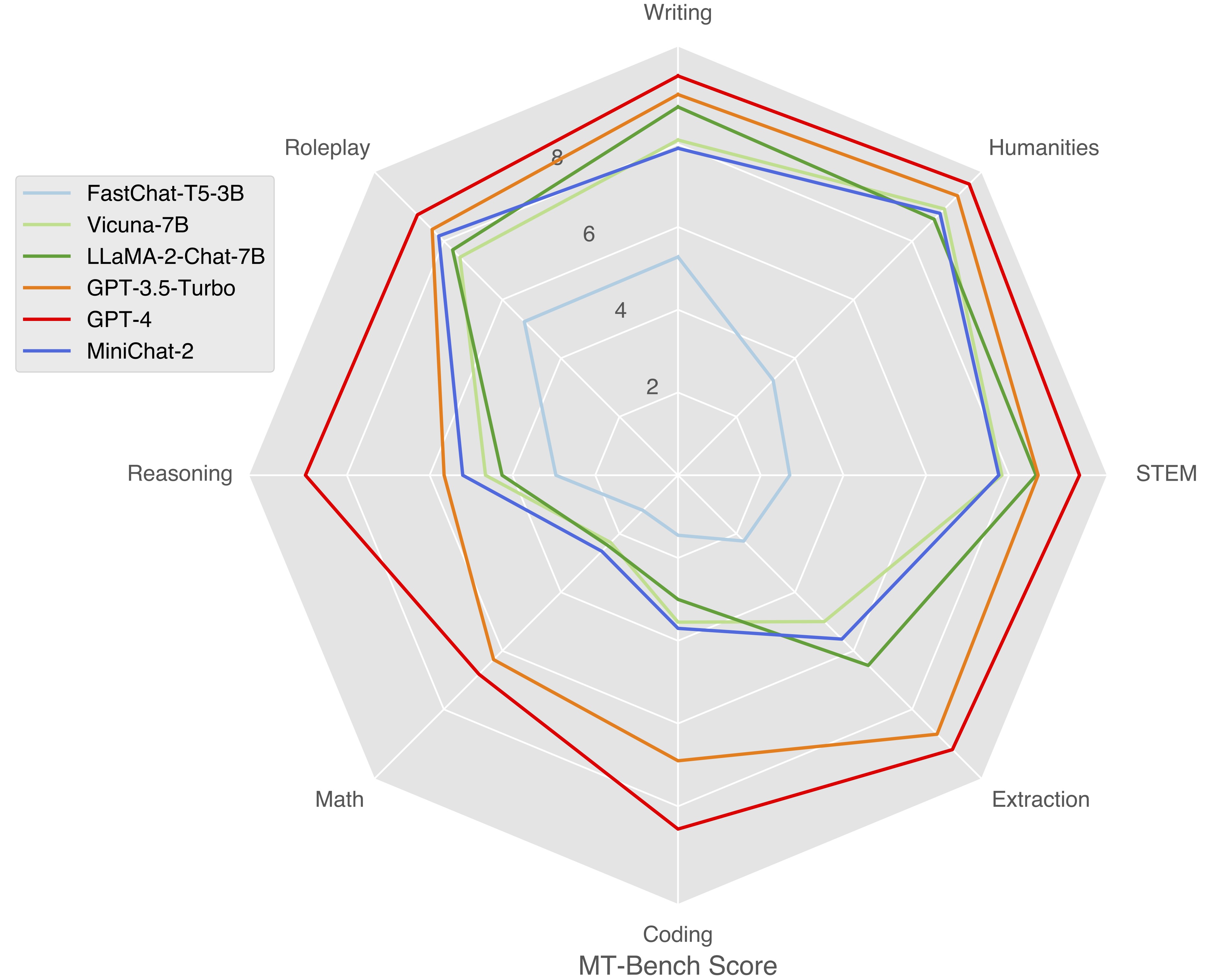
Standard Benchmarks
| Method | TFLOPs | MMLU (5-shot) | CEval (5-shot) | DROP (3-shot) | HumanEval (0-shot) | BBH (3-shot) | GSM8K (8-shot) |
|---|---|---|---|---|---|---|---|
| Mamba-2.8B | 4.6E9 | 25.58 | 24.74 | 15.72 | 7.32 | 29.37 | 3.49 |
| ShearedLLaMA-2.7B | 0.8E9 | 26.97 | 22.88 | 19.98 | 4.88 | 30.48 | 3.56 |
| BTLM-3B | 11.3E9 | 27.20 | 26.00 | 17.84 | 10.98 | 30.87 | 4.55 |
| StableLM-3B | 72.0E9 | 44.75 | 31.05 | 22.35 | 15.85 | 32.59 | 10.99 |
| Qwen-1.8B | 23.8E9 | 44.05 | 54.75 | 12.97 | 14.02 | 30.80 | 22.97 |
| Phi-2-2.8B | 159.9E9 | 56.74 | 34.03 | 30.74 | 46.95 | 44.13 | 55.42 |
| LLaMA-2-7B | 84.0E9 | 46.00 | 34.40 | 31.57 | 12.80 | 32.02 | 14.10 |
| MiniMA-3B | 4.0E9 | 28.51 | 28.23 | 22.50 | 10.98 | 31.61 | 8.11 |
| MiniChat-3B | 4.0E9 | 38.40 | 36.48 | 22.58 | 18.29 | 31.36 | 29.72 |
| MiniMA-2-3B | 13.4E9 | 40.14 | 44.65 | 23.10 | 14.63 | 31.43 | 8.87 |
| MiniChat-2-3B | 13.4E9 | 46.17 | 43.91 | 30.26 | 22.56 | 34.95 | 38.13 |
Instruction-following Benchmarks
| Method | AlpacaEval | MT-Bench | MT-Bench-ZH |
|---|---|---|---|
| GPT-4 | 95.28 | 9.18 | 8.96 |
| Zephyr-7B-Beta | 90.60 | 7.34 | 6.27# |
| Vicuna-7B | 76.84 | 6.17 | 5.22# |
| LLaMA-2-Chat-7B | 71.37 | 6.27 | 5.43# |
| Qwen-Chat-7B | - | - | 6.24 |
| Phi-2-DPO | 81.37 | - | 1.59#$ |
| StableLM-Zephyr-3B | 76.00 | 6.64 | 4.31# |
| Rocket-3B | 79.75 | 6.56 | 4.07# |
| Qwen-Chat-1.8B | - | - | 5.65 |
| MiniChat-3B | 48.82 | - | - |
| MiniChat-2-3B | 77.30 | 6.23 | 6.04 |
# specialized mainly for English.
$ finetuned without multi-turn instruction data.
The following is an example code snippet to use MiniChat-2-3B:
import torch

from transformers import AutoModelForCausalLM, AutoTokenizer

from conversation import get_default_conv_template

# MiniChat
tokenizer = AutoTokenizer.from_pretrained("GeneZC/MiniChat-2-3B", use_fast=False)
# GPU.
model = AutoModelForCausalLM.from_pretrained("GeneZC/MiniChat-2-3B", use_cache=True, device_map="auto", torch_dtype=torch.float16).eval()
# CPU.
# model = AutoModelForCausalLM.from_pretrained("GeneZC/MiniChat-2-3B", use_cache=True, device_map="cpu", torch_dtype=torch.float16).eval()

conv = get_default_conv_template("minichat")

question = "Implement a program to find the common elements in two arrays without using any extra data structures."
conv.append_message(conv.roles[0], question)
conv.append_message(conv.roles[1], None)
prompt = conv.get_prompt()
input_ids = tokenizer([prompt]).input_ids
output_ids = model.generate(
    torch.as_tensor(input_ids).cuda(),
    do_sample=True,
    temperature=0.7,
    max_new_tokens=1024,
)
output_ids = output_ids[0][len(input_ids[0]):]
output = tokenizer.decode(output_ids, skip_special_tokens=True).strip()
# output: "def common_elements(arr1, arr2):\n    if len(arr1) == 0:\n        return []\n    if len(arr2) == 0:\n        return arr1\n\n    common_elements = []\n    for element in arr1:\n        if element in arr2:\n            common_elements.append(element)\n\n    return common_elements"
# Multiturn conversation could be realized by continuously appending questions to `conv`.
@article{zhang2023law,
    title={Towards the Law of Capacity Gap in Distilling Language Models},
    author={Zhang, Chen and Song, Dawei and Ye, Zheyu and Gao, Yan},
    year={2023},
    url={https://arxiv.org/abs/2311.07052}
}
2-bit
3-bit
4-bit
5-bit
6-bit
8-bit
Base model
GeneZC/MiniChat-2-3B
docker model run hf.co/cgus/MiniChat-2-3B-iMat-GGUF: