
Instructions to use shi-labs/OLA-VLM-CLIP-ConvNeXT-Phi3-4k-mini with libraries, inference providers, notebooks, and local apps. Follow these links to get started.
- Libraries
- Transformers
How to use shi-labs/OLA-VLM-CLIP-ConvNeXT-Phi3-4k-mini with Transformers:
# Use a pipeline as a high-level helper from transformers import pipeline pipe = pipeline("image-text-to-text", model="shi-labs/OLA-VLM-CLIP-ConvNeXT-Phi3-4k-mini", trust_remote_code=True) messages = [ { "role": "user", "content": [ {"type": "image", "url": "https://huggingface.co/datasets/huggingface/documentation-images/resolve/main/p-blog/candy.JPG"}, {"type": "text", "text": "What animal is on the candy?"} ] }, ] pipe(text=messages)# Load model directly from transformers import AutoModelForCausalLM model = AutoModelForCausalLM.from_pretrained("shi-labs/OLA-VLM-CLIP-ConvNeXT-Phi3-4k-mini", trust_remote_code=True, dtype="auto") - Notebooks
- Google Colab
- Kaggle
- Local Apps Settings
- vLLM
How to use shi-labs/OLA-VLM-CLIP-ConvNeXT-Phi3-4k-mini with vLLM:
Install from pip and serve model
# Install vLLM from pip: pip install vllm # Start the vLLM server: vllm serve "shi-labs/OLA-VLM-CLIP-ConvNeXT-Phi3-4k-mini" # Call the server using curl (OpenAI-compatible API): curl -X POST "http://localhost:8000/v1/chat/completions" \ -H "Content-Type: application/json" \ --data '{ "model": "shi-labs/OLA-VLM-CLIP-ConvNeXT-Phi3-4k-mini", "messages": [ { "role": "user", "content": [ { "type": "text", "text": "Describe this image in one sentence." }, { "type": "image_url", "image_url": { "url": "https://cdn.britannica.com/61/93061-050-99147DCE/Statue-of-Liberty-Island-New-York-Bay.jpg" } } ] } ] }'Use Docker
docker model run hf.co/shi-labs/OLA-VLM-CLIP-ConvNeXT-Phi3-4k-mini
- SGLang
How to use shi-labs/OLA-VLM-CLIP-ConvNeXT-Phi3-4k-mini with SGLang:
Install from pip and serve model
# Install SGLang from pip: pip install sglang # Start the SGLang server: python3 -m sglang.launch_server \ --model-path "shi-labs/OLA-VLM-CLIP-ConvNeXT-Phi3-4k-mini" \ --host 0.0.0.0 \ --port 30000 # Call the server using curl (OpenAI-compatible API): curl -X POST "http://localhost:30000/v1/chat/completions" \ -H "Content-Type: application/json" \ --data '{ "model": "shi-labs/OLA-VLM-CLIP-ConvNeXT-Phi3-4k-mini", "messages": [ { "role": "user", "content": [ { "type": "text", "text": "Describe this image in one sentence." }, { "type": "image_url", "image_url": { "url": "https://cdn.britannica.com/61/93061-050-99147DCE/Statue-of-Liberty-Island-New-York-Bay.jpg" } } ] } ] }'Use Docker images
docker run --gpus all \ --shm-size 32g \ -p 30000:30000 \ -v ~/.cache/huggingface:/root/.cache/huggingface \ --env "HF_TOKEN=<secret>" \ --ipc=host \ lmsysorg/sglang:latest \ python3 -m sglang.launch_server \ --model-path "shi-labs/OLA-VLM-CLIP-ConvNeXT-Phi3-4k-mini" \ --host 0.0.0.0 \ --port 30000 # Call the server using curl (OpenAI-compatible API): curl -X POST "http://localhost:30000/v1/chat/completions" \ -H "Content-Type: application/json" \ --data '{ "model": "shi-labs/OLA-VLM-CLIP-ConvNeXT-Phi3-4k-mini", "messages": [ { "role": "user", "content": [ { "type": "text", "text": "Describe this image in one sentence." }, { "type": "image_url", "image_url": { "url": "https://cdn.britannica.com/61/93061-050-99147DCE/Statue-of-Liberty-Island-New-York-Bay.jpg" } } ] } ] }' - Docker Model Runner
How to use shi-labs/OLA-VLM-CLIP-ConvNeXT-Phi3-4k-mini with Docker Model Runner:
docker model run hf.co/shi-labs/OLA-VLM-CLIP-ConvNeXT-Phi3-4k-mini
OLA-VLM-CLIP-ConvNeXT-Phi3-4k-mini
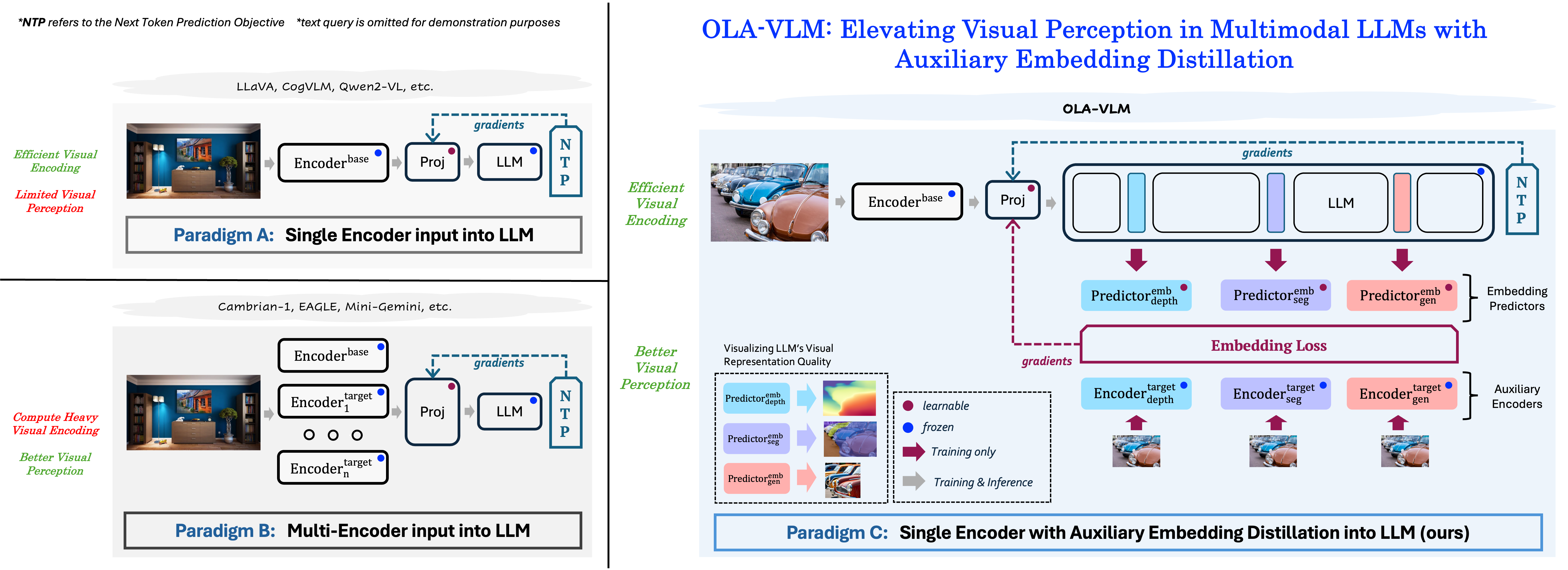
OLA-VLM distills target visual information into the intermediate representations of the LLM from a set of target encoders. It adopts a predictive embedding optimization approach at selected LLM layers during training to minimize the embedding losses along with the next token prediction (NTP) objective, resulting in a vision-centric approach to training the Multimodal Large Language Model.
- GitHub Repo: https://github.com/SHI-Labs/OLA-VLM
- Project Page: https://praeclarumjj3.github.io/ola_vlm/
Get Started with the Model
Clone the repository and follow the setup instructions:
git lfs install
git clone https://github.com/SHI-Labs/OLA-VLM
cd OLA-VLM
After setup, you can use OLA-VLM with the following code:
import gradio as gr
import os
import torch
import numpy as np
from ola_vlm.constants import DEFAULT_IMAGE_TOKEN
from ola_vlm.constants import IMAGE_TOKEN_INDEX, DEFAULT_IMAGE_TOKEN
from ola_vlm.conversation import conv_templates, SeparatorStyle
from ola_vlm.model.builder import load_pretrained_model
from ola_vlm.mm_utils import tokenizer_image_token, get_model_name_from_path, process_images
model_path = "shi-labs/OLA-VLM-CLIP-ConvNeXT-Phi3-4k-mini"
conv_mode = "llava_phi_3"
image_path = "/path/to/OLA-VLM/assets/pb.jpg"
input_prompt = "Describe this image."
# load model
model_name = get_model_name_from_path(model_path)
tokenizer, model, image_processor, context_len = load_pretrained_model(model_path, None, model_name)
# prepare prompt
input_prompt = DEFAULT_IMAGE_TOKEN + '\n' + input_prompt
conv = conv_templates[conv_mode].copy()
conv.append_message(conv.roles[0], input_prompt)
conv.append_message(conv.roles[1], None)
prompt = conv.get_prompt()
# load and preprocess image
image = Image.open(image_path).convert('RGB')
image_tensor = process_images([image], image_processor, model.config)[0]
input_ids = tokenizer_image_token(prompt, tokenizer, IMAGE_TOKEN_INDEX, return_tensors='pt')
input_ids = input_ids.to(device='cuda', non_blocking=True)
image_tensor = image_tensor.to(dtype=torch.float16, device='cuda', non_blocking=True)
# run inference
with torch.inference_mode():
output_ids = model.generate(
input_ids.unsqueeze(0),
images=image_tensor.unsqueeze(0),
image_sizes=[image.size],
do_sample=True,
temperature=0.2,
top_p=0.5,
num_beams=1,
max_new_tokens=256,
use_cache=True)
outputs = tokenizer.batch_decode(output_ids, skip_special_tokens=True)[0].strip()
print(f"Image:{image_path} \nPrompt:{input_prompt} \nOutput:{outputs}")
For more information, please refer to https://github.com/SHI-Labs/OLA-VLM.
Citation
If you found our work useful in your research, please consider starring ⭐ us on GitHub and citing 📚 us in your research!
@article{jain2024ola_vlm,
title={{OLA-VLM: Elevating Visual Perception in Multimodal LLMs with Auxiliary Embedding Distillation}},
author={Jitesh Jain and Zhengyuan Yang and Humphrey Shi and Jianfeng Gao and Jianwei Yang},
journal={arXiv},
year={2024}
}
- Downloads last month
- 3
Model tree for shi-labs/OLA-VLM-CLIP-ConvNeXT-Phi3-4k-mini
Base model
microsoft/Phi-3-mini-4k-instruct